
DX777 Register Pakistan – Create New Account Guide 2026
DX777 Register provides users with a way to create an account and access the platform’s available features. The process usually starts by visiting the official website and locating the account creation option. Users may need to enter basic details, such as a mobile number and password, to complete the initial steps. Before proceeding, it is helpful to review the website’s instructions and understand its account requirements.
A successful account setup allows users to explore the DX777 through their registered profile. Make sure the information you provide is accurate and keep your login details private. Checking the website’s terms, privacy information, and account security guidance can also help users make informed decisions before using its services.
What is DX777 Register?
DX777 Game Register is the account creation process that allows new users to set up a profile on the platform. It generally requires basic information, such as an active mobile number and a secure password. Users can visit the official website, open the registration form, and provide the requested details. The process is designed to give newcomers a straightforward way to create their accounts.
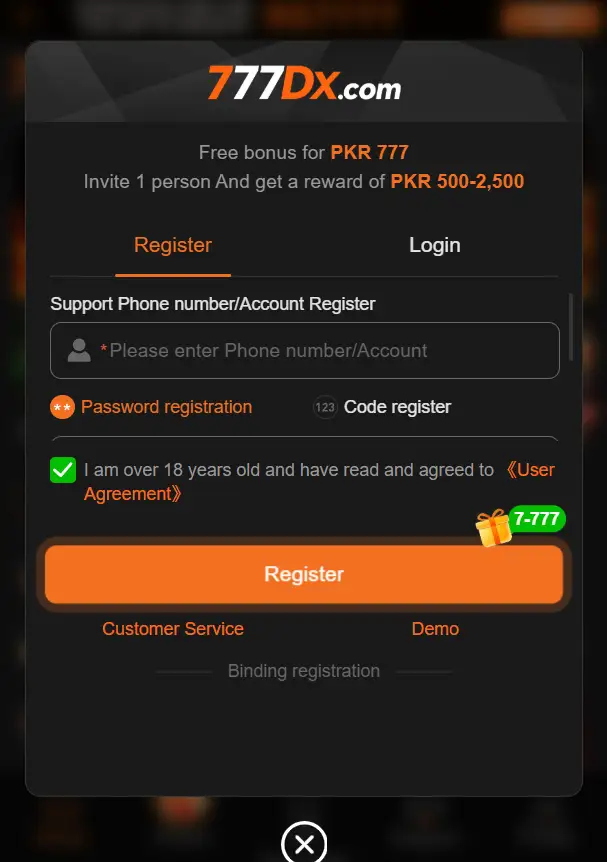
After creating a profile, users can access available sections of the DX777 platform through their account. It is important to enter correct information and keep login credentials safe. Before using any features, users should read the platform’s terms, check its privacy policy, and understand the applicable rules.
Requirements to Create a DX777 Account
Before creating DX777 Game account, users should prepare a few basic details to complete the process smoothly. The following requirements may be needed:
- Active mobile number
- Strong account password
- Stable internet connection
- Accurate personal details
- Compatible smartphone or computer
- Official DX777 website
How to Complete the DX777 Register Process
Follow these simple steps to create your account and access the platform using the required details.
Visit the Official Website
Open the official DX777 website using your browser and find the account creation option.
Click the Register Button
Select the register option to open the account creation form.
Enter Your Mobile Number
Provide an active mobile number that you can access for verification purposes.
Create a Strong Password
Choose a secure password that includes a combination of letters and numbers.
Submit Your Details
Review the entered information and submit the form by following the website’s instructions.
Complete Account Verification
If verification is required, enter the received code to confirm your mobile number and finish the process.
Common DX777 Registration Problems and Solutions
DX777 Users may face a few difficulties while creating an account. Here are some common problems and their possible solutions.
Invalid Mobile Number
Enter an active mobile number in the correct format. Check for missing or extra digits before submitting the form.
Verification Code Not Received
Wait a few minutes and check your mobile network. If the code does not arrive, request another one if the option is available.
Password Not Accepted
Create a password that meets the website’s security requirements. Avoid using very simple or commonly used passwords.
Website Not Loading
Check your internet connection and refresh the page. You can also try opening the website in another browser.
Registration Form Not Submitting
Review all required fields and correct any missing information before submitting the form again.
Duplicate Account Error
If the platform reports an existing account, try the login or password recovery option instead of creating another profile.
How to Keep Your DX777 Game Account Safe
Follow these six simple tips to protect your account and keep your login information secure.
- Create a strong password using letters, numbers, and symbols.
- Keep your DX777 login details private.
- Access your account through trusted devices only.
- Avoid suspicious links and unknown downloads.
- Log out after using a shared device.
- Check your account regularly for unusual activity.
Ending Notes
Keeping your gaming account secure requires simple habits and careful online activity. During the DX777 Register process, always provide accurate information, create a strong password, and keep your login details private. Avoid suspicious links, unknown downloads, and sharing personal information with others.
DX777 users should check their account activity regularly and access their profiles through trusted devices. Always log out after using a shared device and update your password if you notice anything unusual. Following these basic precautions can help protect personal information, maintain account privacy, and support a safer gaming experience.